VGF Library Architecture
VGF Library packages the code, resource descriptions, execution order, and constants needed to deploy a workload as a VGF file. It provides an encoder for creating files and decoders for tools and runtime consumers. The library describes the workload; the consumer implements its execution.
Responsibilities and boundaries
A VGF file contains an indexed module table, an ordered sequence of segments, a model resource table, and constants. Segment metadata connects a module to descriptor bindings, input and output resources, graph constants, dispatch dimensions, and push constant ranges. These records let a consumer reconstruct the relationships needed to prepare and execute the workload. The VGF File Format specifies the serialized representation.
Modules are classified as graph or compute and can store SPIR-V™ binaries, GLSL source, or HLSL source. Modules can also omit their code so that a consumer can supply it later. VGF Library stores these representations without compiling source shaders or executing modules.
A consumer that executes source modules must arrange their compilation. Scenario Runner and Workload Library support source modules for compute workloads when the corresponding compilation support is enabled. Applications using the decoder directly provide their own compilation integration.
Model Converter uses the encoder to produce VGF files. Scenario Runner and Workload Library decode VGF files through their separate runtime implementations; an application can also use the decoder directly. The runtime consumer interprets the decoded metadata, creates the Vulkan® objects, supplies input data, allocates and binds resources, and records and submits execution commands. VGF Library does not create a Vulkan® device or execute Vulkan® commands. Storing Vulkan® enum values and dispatch metadata does not introduce a dependency on the Vulkan® runtime.
Public interfaces and implementation
The C++ implementation is shared by the C and Python interfaces. The diagram shows the library’s API calls and serialization dependencies.
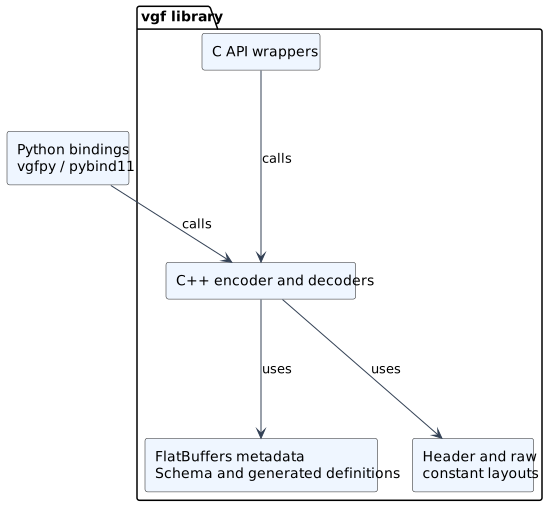
VGF Library interfaces and serialization core.
The C++ API lives in the mlsdk::vgflib namespace. Its encoder constructs
records and returns references used to connect them. Finish finalizes the
metadata tables, and WriteTo writes the complete VGF file to a stream. Decoding
is split into a header decoder and separate decoders for the module, model
sequence, model resource, and constant sections. The header exposes the section
locations so the caller can pass each section’s bytes to its decoder. C++ factory
functions support both allocated decoder objects and construction in
caller-provided storage. See VGF Encoder C++ API and VGF Decoder C++ API for the
construction sequence and API contracts.
The C API wraps the same encoder and decoder implementation. The encoder uses an
opaque handle that owns a C++ encoder, while the decoder API exposes opaque
decoder pointers constructed in caller-provided storage. These wrappers translate
C records and references into the C++ operations; they are part of the vgf
library rather than a second serialization implementation. See
VGF Encoder C API, VGF Decoder C API, VGF Logging C++ API, and
VGF Logging C API for the interface details.
The optional vgfpy extension uses pybind11 to expose the C++ encoder,
decoders, and supporting types to Python. It links to vgf directly. Python
buffer objects provide input bytes, and decoded array data is exposed through
memory views. The VGF Python API Reference documents the Python interface and its
buffer-lifetime requirements.
Serialization core
The module, model sequence, and model resource tables use FlatBuffers. Their
shared schema is schema/vgf.fbs; the encoder and decoders use its generated
C++ definitions internally. The public APIs expose library types and references,
so callers do not need to build or navigate FlatBuffers tables themselves.
The file header and current constants section use dedicated binary layouts
defined in src/header.hpp and src/constant.hpp. Constants are written as
metadata records and raw bytes, separately from the three FlatBuffers tables.
The constant decoder also accepts the older FlatBuffers constant representation.
This division keeps the container layout and section interpretation inside the
core while allowing producers and consumers to use the same public interfaces.
See VGF File Format for layout, alignment, and compatibility details.
Tools and supporting dependencies
VGF Library provides two command-line tools: VGF Dump (vgf_dump) for
inspection and extraction, and VGF Updater (vgf_updater) for format updates.
Both tools use vgf-utils for file handling, memory mapping, and assembling
decoded records into a workload representation. The utilities library also
provides NumPy file I/O and temporary-folder helpers. It is installed and
exported for reuse by other SDK components, including Scenario Runner and
Workload Library. These helpers sit outside the encoder and decoder core.
VGF Dump
vgf_dump uses the decoders to inspect a VGF file, extract module or constant
data, and generate a Scenario Runner JSON template. It uses argparse for
command-line parsing and nlohmann_json for JSON output.
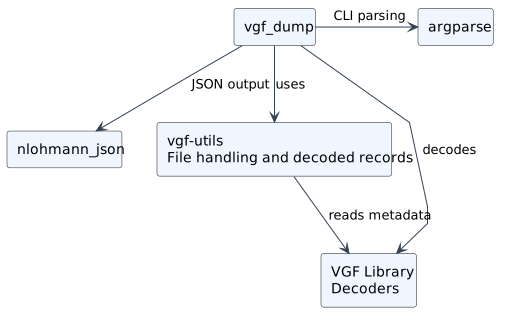
VGF Dump and its supporting libraries.
See VGF Dump Tool for usage and supported options.
VGF Updater
vgf_updater decodes an older VGF file and re-encodes it in the current format.
It uses argparse for command-line parsing.
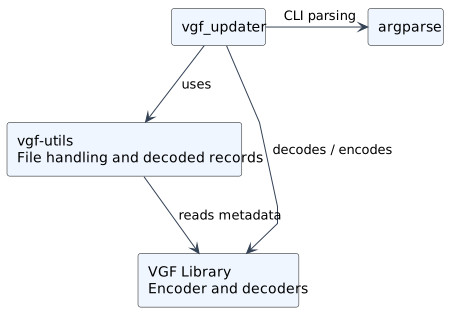
VGF Updater and its supporting libraries.
See VGF Updater Tool for usage and supported options.