ML SDK architecture
The ML SDK for Vulkan® provides tools and libraries for converting ML models into deployment assets and executing ML workloads through Vulkan®. It connects an offline asset pipeline to an application’s Vulkan® execution environment.
This document explains component boundaries and developer workflows. Component API references and implementation documents provide the deeper detail. Platform support and version compatibility are maintained in the Platforms table and the compatibility guide.
System boundaries
The SDK contains five components: Model Converter, VGF Library, Emulation Layer, Scenario Runner, and Workload Library.
There are three principal boundaries:
Model preparation: a framework-specific exporter produces TOSA input. Framework training and export tools are outside the SDK.
Deployment assets: Model Converter produces VGF content containing code, constants, and the metadata needed to construct an execution sequence.
Vulkan® execution: a runtime consumer creates resources and pipelines, records commands, and submits work to a Vulkan® implementation. The SDK’s emulation layers can implement ML extensions using Vulkan® compute.
The application remains responsible for choosing an integration path and connecting workload execution to its input data, output consumers, and rendering or compute schedule. Native acceleration and available operations depend on the target Vulkan® implementation and its advertised capabilities.
Components and relationships
Asset flow and VGF Library dependencies are shown separately below. Vulkan® calls and Emulation Layer integration are covered under Vulkan® implementation and emulation.
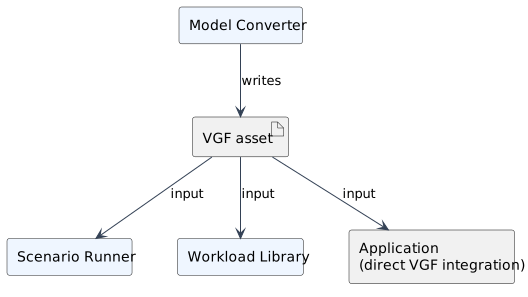
VGF asset flow from conversion to the three runtime integration choices.
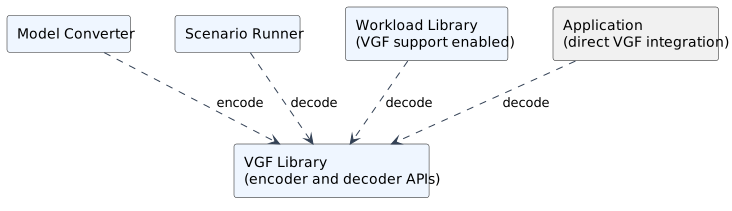
Dependencies on VGF Library. Workload Library’s decoder dependency is optional and enabled with its VGF support.
Component |
Responsibility |
Main interfaces and artifacts |
|---|---|---|
Model Converter |
Transforms supported TOSA input into SPIR-V™ graphs and VGF execution metadata, including compute-shader segments for supported custom shaders. |
Command-line tool; TOSA FlatBuffer or MLIR input; VGF output. |
VGF Library |
Encodes and decodes deployment assets. Exposes modules, sequences, resources, bindings, and constants without creating Vulkan® objects. |
C/C++ encoder and decoder APIs, Python bindings, VGF Dump and Updater tools. |
Emulation Layer |
Implements graph and tensor extension behavior through Vulkan® layers, translating supported workloads into compute operations. |
Vulkan® entry points; graph and tensor layer manifests. |
Scenario Runner |
Constructs and executes scenarios, manages resources and commands, and collects results and diagnostics. |
JSON/CLI workflow, C++ and Python APIs; VGF, shaders, graph inputs, and data. |
Workload Library |
Provides application integration for VGF and standalone compute or data-graph workloads, with resource inspection and execution management. |
C++ API; application-owned or library-owned Vulkan® context and resources. |
Model Converter and Scenario Runner depend on VGF Library. Workload Library uses it when VGF support is enabled and can also be built for standalone workloads without that support. Emulation Layer is selected through Vulkan® layer discovery and activation; runtime consumers reach it through Vulkan® calls.
Model conversion and the deployment asset
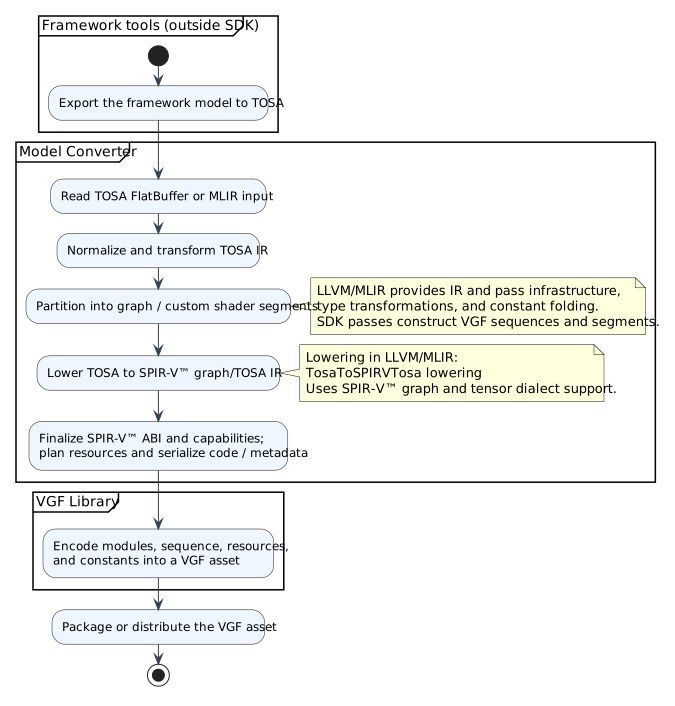
Principal model-to-VGF flow, including the division between Model Converter and LLVM/MLIR.
The normal model deployment flow begins with framework export to TOSA. Model Converter accepts TOSA FlatBuffer or MLIR input, including MLIR bytecode. The TOSA Tools dependency supplies FlatBuffer-to-MLIR translation. Conversion then uses the MLIR pass manager to transform that representation.
The pipeline coordinates normalization, canonicalization, type narrowing, constant folding, model partitioning, resource planning, and serialization. Its VGF dialect represents execution sequences and segments, including the boundaries between graph segments and custom compute-shader segments. Options and input content determine which transformations apply.
An important part of this pipeline is implemented in LLVM/MLIR. The lowering
passes contributed upstream form a substantial part of model conversion. In
particular, TosaToSPIRVTosa lowers TOSA operations to the SPIR-V™ graph/TOSA
representation, working with the SPIR-V™
dialect’s graph and tensor support. LLVM/MLIR also supplies transformations for
constant handling, types, and SPIR-V™ ABI and capability information. Model
Converter assembles these passes with its own partitioning, VGF dialect,
resource handling, and packaging logic.
The resulting VGF asset contains:
A module table containing graph or compute modules and their entry points.
A sequence table describing ordered execution segments and their bindings.
A resource table describing inputs, outputs, intermediates, and constants, including applicable shapes, strides, formats, and alias relationships.
A constants section containing payloads needed by the workload.
VGF combines FlatBuffers metadata with a fixed header and a constants section. It can carry SPIR-V™ code and GLSL/HLSL source modules. Current runtime consumers support source modules for compute workloads and require the corresponding compilation support to be enabled. The format also supports shader placeholders whose implementations are supplied by the runtime consumer.
VGF can be distributed as a file or embedded in application packaging. Its decoder exposes views over supplied content, so the consumer must respect the backing storage lifetime. The format carries execution descriptions; Vulkan® pipeline creation and resource allocation happen in the runtime consumer. See the VGF format specification for the binary layout and compatibility rules.
Runtime integration
Applications and exploration tools can consume the same deployment asset at different integration levels.
Workload Library
An application loads VGF content or constructs a standalone workload, inspects resource requirements, and creates or wraps a Vulkan® context. It creates a session, supplies module implementations where required, and configures the session. It then binds resources and prepares execution. Shared compiled state can reuse pipelines across sessions.
The library can allocate resources or use application-owned Vulkan® resources.
Prepared execution can either record into an application command buffer or
record, submit, and wait through the library’s run() operation. With an
application command buffer, the application controls submission and
synchronization with surrounding work. Borrowed contexts, resources, and source
data must remain valid for the lifetimes specified by the API.
Scenario Runner
A developer describes resources and commands in JSON or constructs a scenario through the C++ or Python API. Scenario Runner resolves those descriptions, loads data and modules, creates Vulkan® execution state, records commands, and runs the scenario. A scenario can mix VGF dispatches with other supported commands, including compute and graph dispatches. Output files, downloaded resources, profiling information, and diagnostics support exploration.
For VGF exploration, VGF Dump can generate a scenario template. The developer supplies the intended resource data and execution configuration before running it. The VGF execution tutorial describes this workflow.
Direct VGF integration
An application can use the VGF decoder directly and translate its metadata into Vulkan® objects and commands. In this path the application manages resource allocation, descriptor bindings, graph and compute pipelines, graph sessions, recording, synchronization, and submission. VGF Library supplies the decoded asset representation and makes no Vulkan® API calls.
Vulkan® implementation and emulation
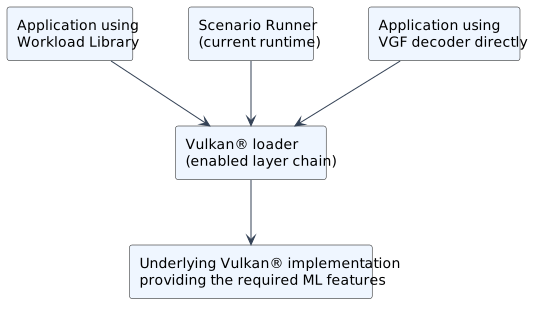
Native execution when the target provides the required ML features.
The Vulkan® loader dispatches calls through enabled layers to the underlying implementation. A target can provide the required ML features itself. The SDK’s Emulation Layer provides an alternative implementation of supported features using graph and tensor layers:
VK_LAYER_ML_Graph_Emulationimplements data-graph pipelines and sessions. It processes supported graph instructions and constructs compute operations, with session memory planning for intermediate data. TOSA and Motion Engine instruction sets and optical-flow workloads use this graph infrastructure.VK_LAYER_ML_Tensor_Emulationimplements tensor objects, views, descriptor handling, and related operations. Tensor-using compute shaders are translated through SPIRV-Cross to GLSL and compiled back to SPIR-V™ using glslang.
In the current SDK, graph emulation requires the tensor emulation layer. Enable the graph layer before the tensor layer in the Vulkan® layer chain. Tensor emulation can also be used on its own.
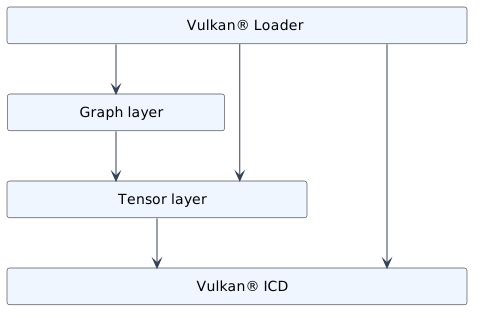
Graph emulation depends on tensor emulation. Loader calls can also target the tensor layer or ICD directly.
The diagram shows representative paths through the enabled layers. Graph-layer tensor calls use the tensor layer; compute and supporting calls reach the underlying implementation. The underlying implementation must provide the features not supplied by the enabled layers.
Both layers depend on an underlying Vulkan® implementation to execute work. Emulation is useful for development and functional exploration; its execution strategy and performance should be distinguished from a target’s native ML implementation. Enabled extensions, operations, data types, and resource formats must be supported by the selected execution path.
Developer workflows
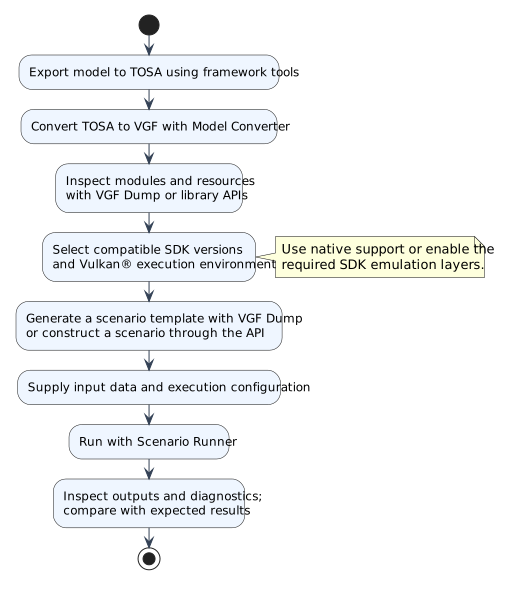
Model preparation and execution exploration with Scenario Runner.
For an existing model, export TOSA, convert it to VGF, and inspect the resulting modules and resource requirements. Use Scenario Runner to explore execution and compare results with the expected outputs. Select compatible SDK/component versions and a Vulkan® execution environment before investigating differences.
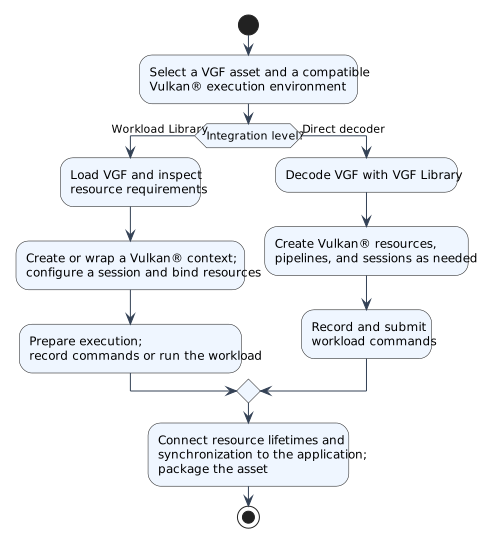
Application integration through Workload Library or the VGF decoder. The integration choice can be revisited as development progresses.
For application integration, use Workload Library’s samples to establish a resource and command-buffer integration strategy, or implement the direct VGF path when the application needs to manage that translation itself. Package the asset and connect execution to the application’s resource lifetimes and synchronization.
A workload can also start from existing SPIR-V™ modules or a programmatic description. Standalone compute and data-graph workloads can be constructed through Workload Library or Scenario Runner without model export or VGF generation. VGF Library’s encoder is available when a tool needs to package modules, resources, and sequences directly.
The Where can I find sample models, VGFs and workload examples? guidance links to model tutorials, scenario examples, and Workload Library integration samples.
Technology and dependency roles
Technology |
Role |
|---|---|
MLIR and TOSA |
MLIR supplies extensible IR and pass infrastructure. TOSA represents tensor operations and their semantics. Model Converter uses TOSA, SPIR-V™, and VGF dialects during conversion. |
SPIR-V™ graphs and tensors |
|
Vulkan® tensors |
|
Vulkan® data graphs |
|
Vulkan® compute and synchronization |
Compute pipelines execute custom shaders and emulated operations. Command buffers, descriptor sets, barriers, queues, and fences connect execution to the rest of the application. |
LLVM/MLIR and TOSA Tools support model conversion; FlatBuffers supports asset metadata and TOSA serialization. SPIRV-Tools supports SPIR-V™ processing, while SPIRV-Cross and glslang support shader translation and compilation. Optional DXC support enables HLSL compilation in supported runtime consumers. The Vulkan® headers supply API declarations; a Vulkan® loader and implementation are separate runtime requirements. JSON, argparse, and pybind11 support configuration, command-line tools, and Python bindings.
Detailed feature support and extension links are maintained in the SDK introduction, FAQ, and component documentation. These descriptions should be read alongside the selected component versions and device capability queries.