Introduction
The ML SDK for Vulkan® is a collection of libraries and tools consisting of various components:
The following figure shows how you can use each of the ML SDK for Vulkan® components in a larger system:
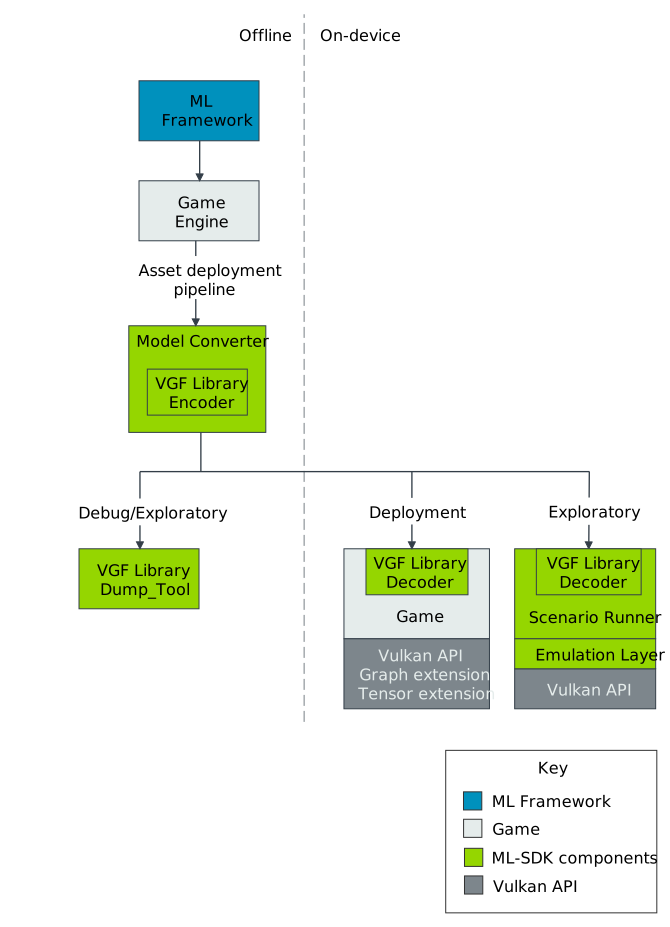
The following gives a brief introduction to each of the ML SDK for Vulkan® components:
- Model Converter
Converts TOSA models into SPIR-V™ graphs and packages the whole use case into a VGF file. The Model Converter must be used as part of an asset pipeline deployment flow and is separated into two stages:
1. The framework specific conversion mechanism lowers the framework model to a TOSA intermediate representation (not part of the ML SDK for Vulkan®).
2. The Model Converter applies additional transforms and optimizations before lowering to SPIR-V™ graph intermediate representation (IR) and then packaging the use case into a
.vgffile.- VGF Library
A simple, efficient container format for ML use cases consisting of SPIR-V™ graphs, custom shaders, and constant data. This component provides:
A C++ encoder and decoder API for writing and efficiently reading VGF files.
C encoder and decoder wrapper APIs.
Python bindings for encoding and decoding.
VGF Dump and VGF Updater tools for inspecting and migrating VGF files.
The VGF Library is intended for integration into game engines. The library has been designed around efficient decoding of the VGF file at runtime by supporting memory mapped file access (optional). The library requires user managed memory allocation to minimise copying and in-memory duplication of potentially large constant data.
- Scenario Runner
A tool and library for exploring and validating workloads described in JSON scenario files or constructed through C++ and Python APIs. It manages resources and commands, executes scenarios through Vulkan®, and collects outputs and diagnostics.
- Emulation layer
A TOSA compliant, compute-based implementation exposed using Vulkan® Layers. The Emulation Layer currently exposes VK_ARM_tensors, VK_ARM_data_graph, VK_ARM_data_graph_instruction_set_tosa, and VK_ARM_data_graph_optical_flow. The corresponding SPIR-V™ extensions and extended instruction sets currently in use are SPV_ARM_graph, SPV_ARM_tensors, TOSA.001000.1 and Arm.MotionEngine.100.
- Workload Library
Provides a C++ runtime API for constructing VGF-backed or standalone compute and data-graph workloads. Applications can use an existing Vulkan® context or let the library create one, bind application-owned or library-allocated resources, and run the workload or record it into an application command buffer.
In addition to these components, you will find documentation, tutorials, samples, and tests.
Production
The model-based production workflow involves integrating the ML SDK Model Converter into the
application or game asset deployment pipeline. The pipeline needs a TOSA intermediate
representation of a framework specific native model file. To obtain a TOSA intermediate
representation, you should use a specific framework to TOSA converter (not depicted here).
For example:
The TOSA intermediate representation is then passed to the ML SDK Model Converter
to produce a .vgf file. The VGF file contents can then be:
Embedded into the game or application’s native packaging format.
Distributed as a file on disk as part of the normal platform specific application deployment flow.
Tip
Model Converter accepts TOSA FlatBuffer or MLIR input. Framework-specific export happens before this step. For exploration, Scenario Runner can load the resulting VGF asset through a scenario; VGF Dump can generate a scenario template. See the VGF execution tutorial.
The application or game running on the device can choose the integration level that fits its Vulkan® architecture:
Integrate the ML Workload Library for Vulkan® for a higher-level execution path. It consumes VGF or programmatic workload descriptions, exposes their resource requirements, configures execution state, and either runs the workload or records it into an application command buffer.
Integrate the
ML SDK VGF Library decoderdirectly when the application needs full control over translating VGF metadata into Vulkan® objects and commands.
Note
The ML SDK VGF Library does not call the Vulkan® API. In the direct decoder integration path, the application must translate the parsed information into Vulkan® API calls, including memory allocation, resource and pipeline creation, synchronization, and session management.
Exploration
When exploring the viability of a ML use case or API integration, it can be useful to first explore the use case for the ML SDK Scenario Runner. The ML SDK Scenario Runner allows running use cases in a declarative manner before working on more complicated feature integrations.
The ML Workload Library for Vulkan® samples provide the next step for exploring C++ application integration, including VGF inspection and execution, standalone compute and data-graph workloads, and application-owned Vulkan® contexts. No ML SDK executable currently integrates the library on behalf of an application.
Scenario Runner currently implements its own Vulkan® execution path. Standalone compute and data-graph workloads can also be constructed through either runtime’s APIs without exporting a model to VGF.
Tip
While the API is relatively new, we recommend you use the ML Emulation Layer for Vulkan® for exploration. The Emulation Layer provides a TOSA conformant software implementation of VK_ARM_tensors, VK_ARM_data_graph, VK_ARM_data_graph_instruction_set_tosa, and VK_ARM_data_graph_optical_flow, together with support for the SPV_ARM_graph and SPV_ARM_tensors SPIR-V™ extensions, and TOSA.001000.1 and Arm.MotionEngine.100 extended instruction sets. The Emulation Layer is enabled by the Vulkan® Layer mechanism.
Another useful tool for exploration and debugging is the VGF Dump Tool. The VGF Dump Tool allows a developer to extract specific elements of the VGF file or even generate a template scenario description for a VGF file.
Platforms
This table represents the status of platform support: supported (✅), unsupported (❌) and not applicable (N/A). We will increase support in the upcoming releases.
Platforms |
Model Converter |
VGF Library |
Scenario Runner |
Emulation Layer |
Workload Library |
|
|---|---|---|---|---|---|---|
Linux |
AArch64 |
✅ |
✅ |
✅ |
✅ |
✅ |
X86-64 |
✅ |
✅ |
✅ |
✅ |
✅ |
|
Windows® |
AArch64 |
❌ |
❌ |
❌ |
❌ |
❌ |
X86-64 |
✅ |
✅ |
✅ |
✅ |
✅ |
|
Darwin |
AArch64 |
✅ |
✅ |
✅ * |
✅ * |
✅ * |
X86-64 |
❌ |
❌ |
❌ |
❌ |
❌ |
|
Android™ |
AArch64 |
N/A |
✅ ** |
✅ ** |
✅ ** |
✅ ** |
X86-64 |
N/A |
❌ |
❌ |
❌ |
❌ |
|
* Experimental ML SDK for Vulkan® support via MoltenVK or KosmicKrisp. See Using the ML SDK for Vulkan® on Darwin for prerequisites, driver selection, and current limitations.
** Initial Experimental support on Android™.
See details of limitations in the “Known Limitations” section of each component.
Tensor Data Types
This table summarizes single-channel tensor element formats that are currently handled by the ML SDK Model Converter, ML SDK Scenario Runner, ML Emulation Layer for Vulkan®, and ML Workload Library for Vulkan®.
The ML SDK VGF Library is not listed because it stores encoded tensor format metadata without adding data type-specific validation rules.
This table represents the status of tensor data type support: supported (✅) and unsupported (❌).
Tensor data type |
ML SDK Model Converter |
ML SDK Scenario Runner |
ML SDK Emulation Layer |
Workload Library |
|---|---|---|---|---|
bool |
✅ |
✅ |
✅ |
✅ |
uint8 |
✅ |
✅ |
✅ |
✅ |
int8 |
✅ |
✅ |
✅ |
✅ |
uint16 |
✅ |
✅ |
✅ |
✅ |
int16 |
✅ |
✅ |
✅ |
✅ |
uint32 |
✅ |
✅ |
✅ |
✅ |
int32 |
✅ |
✅ |
✅ |
✅ |
int64 |
✅ |
✅ |
✅ |
✅ |
float16 |
✅ |
✅ |
✅ |
✅ |
float32 |
✅ |
✅ |
✅ |
✅ |
BFloat16 |
✅ |
✅ |
✅ |
✅ |
Float8E4M3 |
✅ |
✅ |
✅ |
✅ |
Float8E5M2 |
✅ |
✅ |
✅ |
✅ |
The Model Converter column reflects the VGF tensor formats it can emit after lowering.
The Emulation Layer column reflects the tensor layer and the shared tensor format handling used by the graph layer.
The Scenario Runner preserves the payload bytes for BFloat16 and the Float8 encodings when reading and writing NumPy files, rather than converting them to native NumPy floating-point scalar types.
The Workload Library represents these formats in its resource model and uses them when creating Vulkan® tensor descriptions, allocations, and views. Actual execution depends on the workload and the formats supported by the target Vulkan® implementation.
Refer to JSON Test Description Specification for detailed Scenario Runner data type support information.